12 Best Free and Paid Photoshop Actions For Incredible Sketching Effects

Olive Street Design • October 3, 2022

12 BEST FREE AND PAID PHOTOSHOP ACTIONS FOR INCREDIBLE SKETCHING EFFECTS

Using Photoshop sketch actions, you can turn an image into a drawing in just a few steps. To enhance your photo, try using oil painting, outline, watercolor, digital drawing, and pencil sketch effects. These free and paid actions are created by professional designers and photographers.

The actions come in ATN format. It is compatible with most versions of Photoshop, including Mobile, CC3–CS6, and CC. You can also use these actions in Creative Cloud to edit RAW and JPG images.

How to Install Photoshop Actions?

Photoshop sketch actions are very easy to install. Follow a few simple steps to start applying them. It takes only a couple of minutes.

STEP 1. Save actions in an easily accessible place on your computer so that you can quickly find them in the appropriate folder.

STEP 2. Open Photoshop and go to the “Actions” panel. If you do not see this panel, go to the “Window” section, then click “Actions” in the drop-down list.

STEP 3. In the upper right corner of the “Actions” panel, click on the small icon with 4 horizontal lines.

STEP 4. Select “ Load Actions ” from the drop-down menu.

STEP 5. Go back to where you saved the actions and select the file in “ .atn” format.

STEP 6. Click “ Open” and your actions will be loaded into the action panel.

When actions are loaded, don’t close the program until you delete the original folder with these actions. To properly launch and use Photoshop actions, make sure your Actions Palette is open and visible.

1. Free Sketch Actions
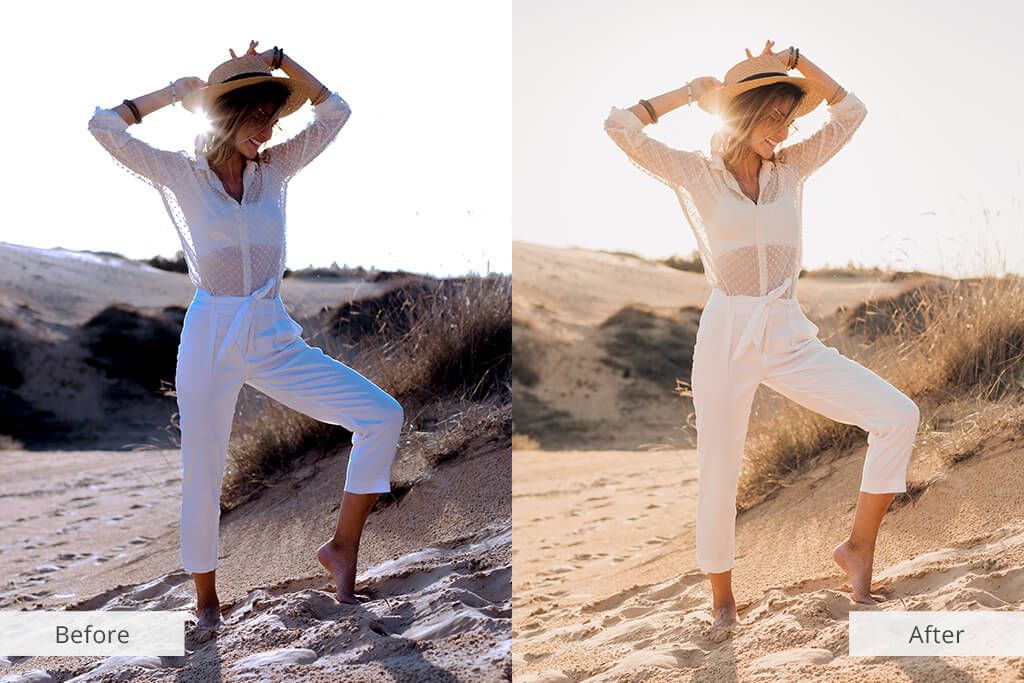
A woman in a hat is standing on one leg on the beach.

Use these free Photoshop sketch actions to create impressive realistic images. To apply any of them, you can use options such as brush painting, brushstrokes, digital painting, etc. What’s more, you can manually adjust the settings of each Photoshop sketch effect to suit your unique style. You can apply these actions to a variety of image formats, including RAW and JPG.

2. Professional Sketch Actions
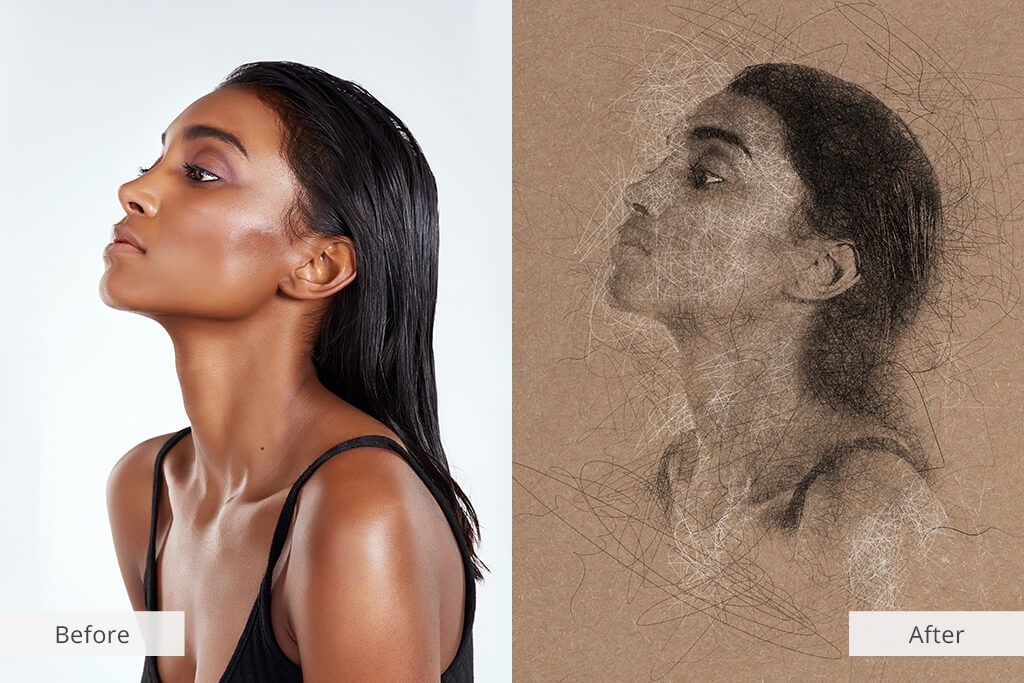
A before and after picture of a woman 's face.

If you want to turn your photo into a pencil sketch, you can do it quite easily using these incredible Photoshop actions. By downloading this pack, you will get five professional Photoshop actions. Use them to create a pencil sketch, watercolor, outline, or digital sketch. You can use layers to experiment with different effects and create perfect images.

3. Oil Painting Actions
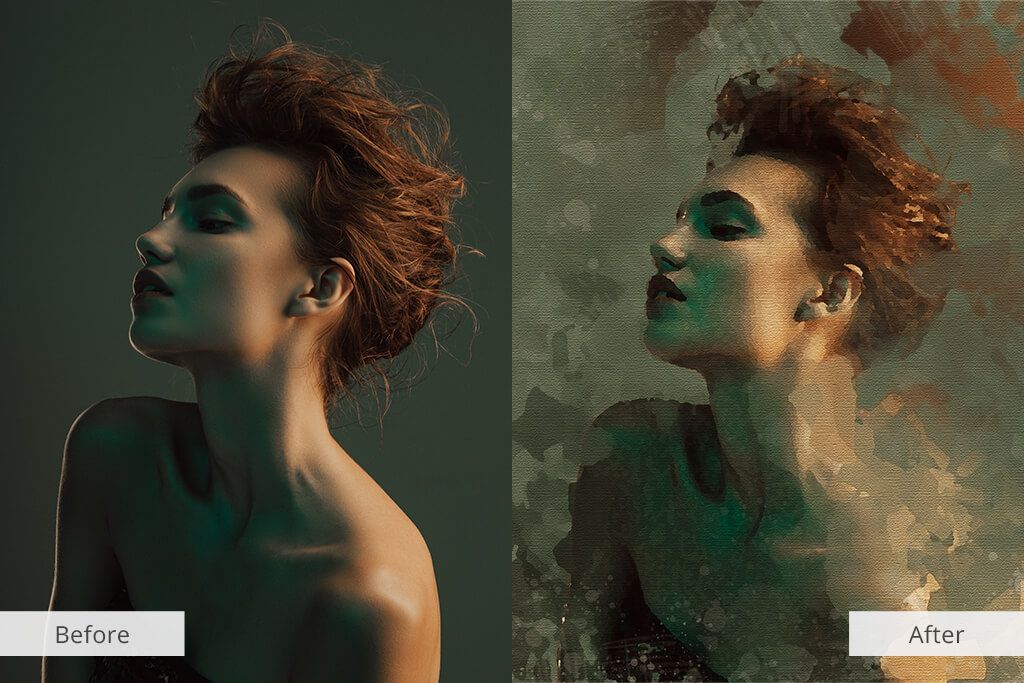
A before and after picture of a woman 's face.

Transform your favorite photos into an oil painting with these cool Photoshop actions. The pack contains 5 professional actions as well as 20 trendy brushes to help you create an oil painting in just a few clicks. The Oil Painting sketch action is perfect for customizing portrait and landscape images and makes it possible to change each layer to suit your needs. You can use them for your album, wedding, party, portrait photos, etc.

4. Watercolor Painter Actions
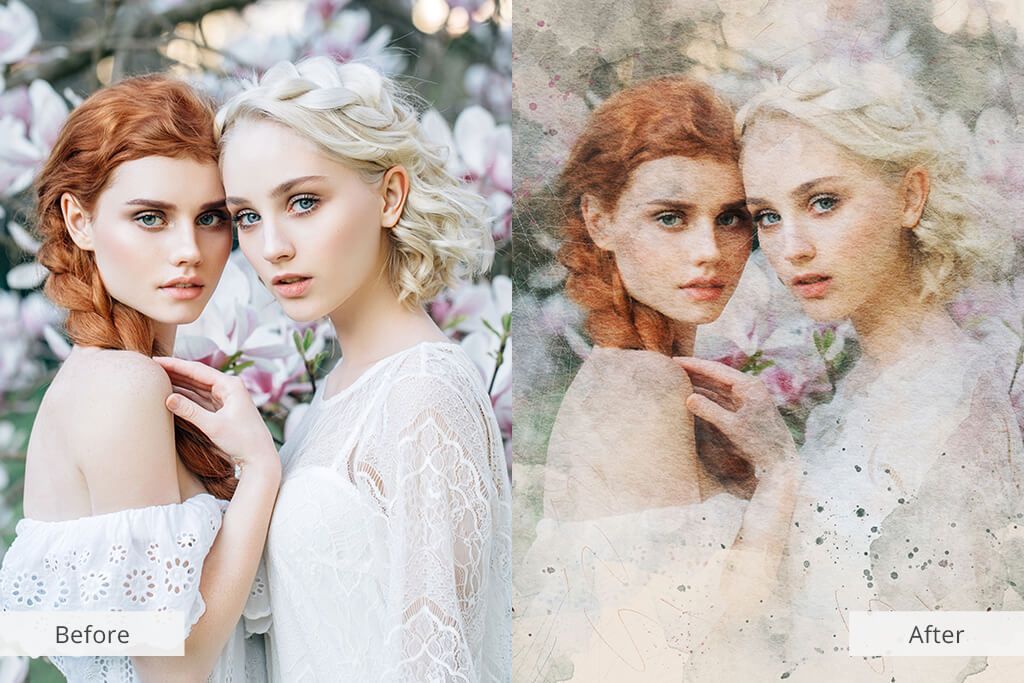
Two women are standing next to each other in front of a tree with flowers.

Whether you need to create a unique background for a website, poster, sketch, or artistic photo composition, use Watercolor Painter actions to make your design stand out. This Photoshop sketch action turns photos into paintings with a realistic watercolor effect. It can be applied instantly, with just a few clicks. What’s more, the set comes with brushes and patterns for creating an amazing effect.

5. Pop Art Actions
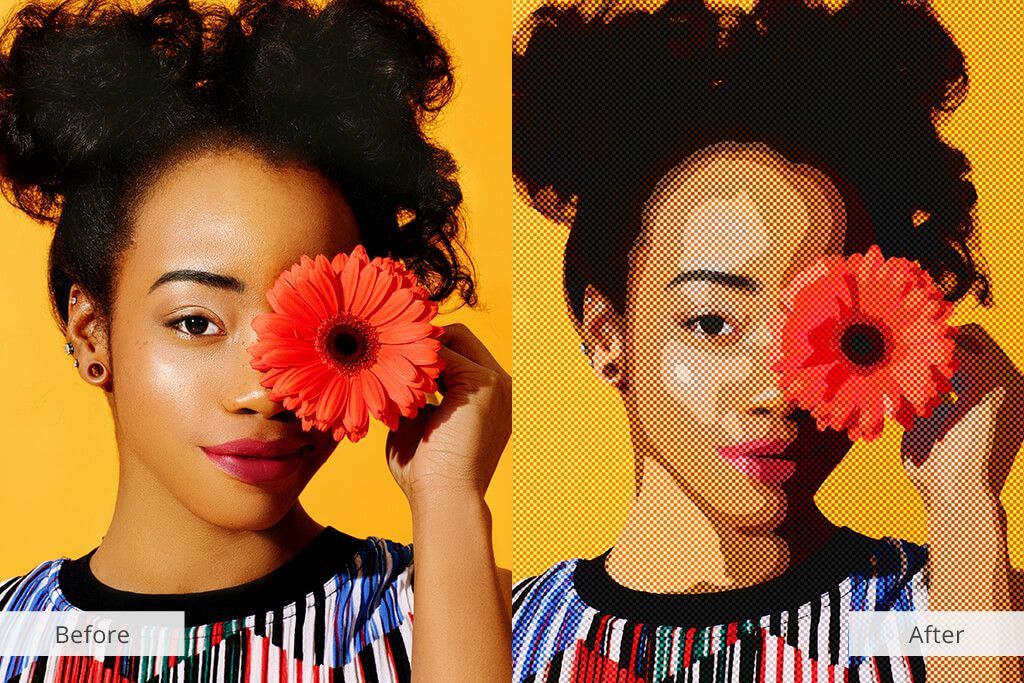
A woman is holding a flower in front of her eyes.

This set of actions is perfect for turning your photo into real pop art. This collection includes 12 actions and 35 add-ons for transforming your images into original and colorful pictures. This action set will enhance your photos by making them more textured. After applying the desired effect, you can also further edit the photo according to your preferences.

6. Cartoon Effect Actions
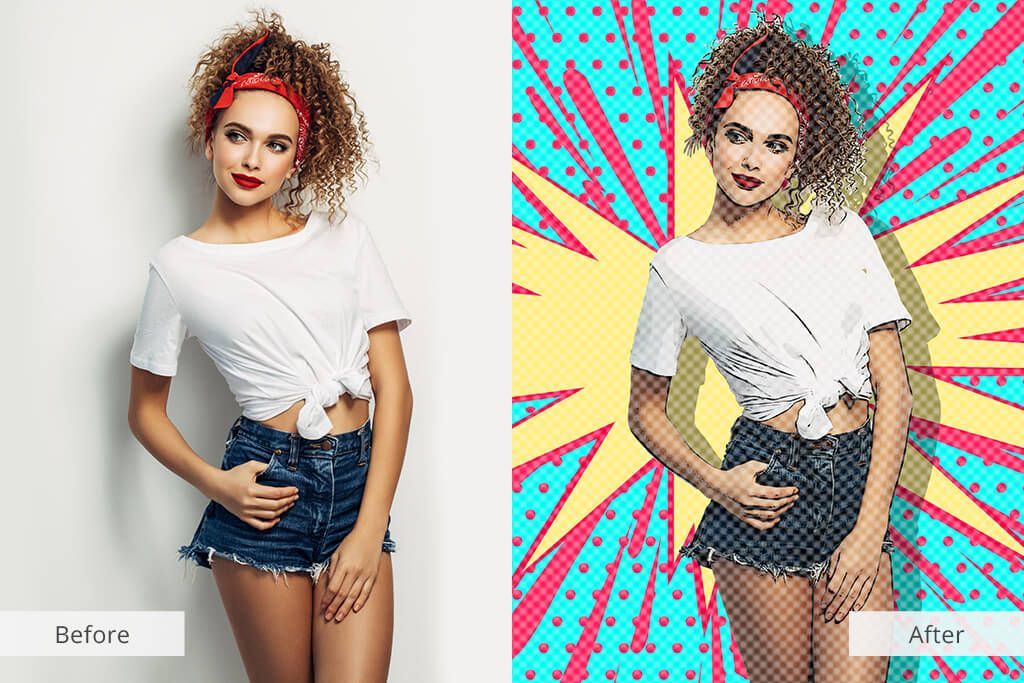
A woman is standing in front of a pop art background.

You can quickly create cartoonish photo effects with this set of actions. It offers a choice of tricolor comics, pixel games, and comic book effects. In the collection, you will find seven professional actions that can be used with versions of CS5 and above. It’s also compatible with Creative Cloud. These effects allow you to achieve impressive results and personalize your photos.

7. Glitch Effect Actions
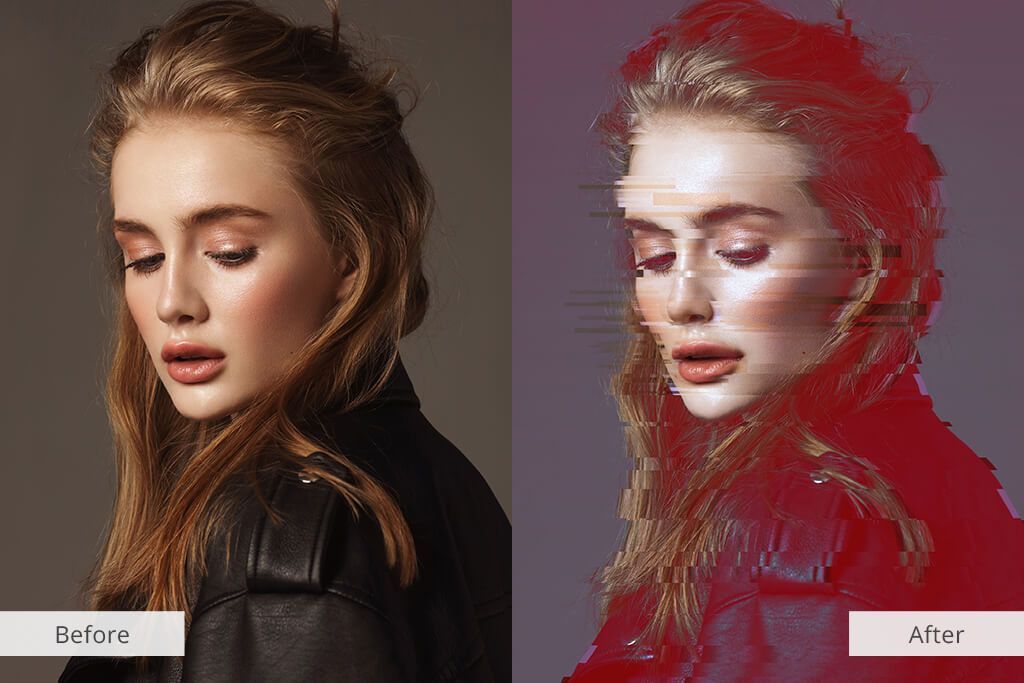
A before and after picture of a woman 's face.

Thanks to Photoshop’s Glitch Effect actions, you can create your unique style with a couple of clicks. This Photoshop sketch effect will add a sense of movement to the photos and blur them a little, giving the image a somewhat vintage look. You can apply the Photoshop Glitch Actions collection to RAW and JPG image formats. It is compatible with Adobe Photoshop CS5 and higher versions.

8. Sparkle Collection Actions
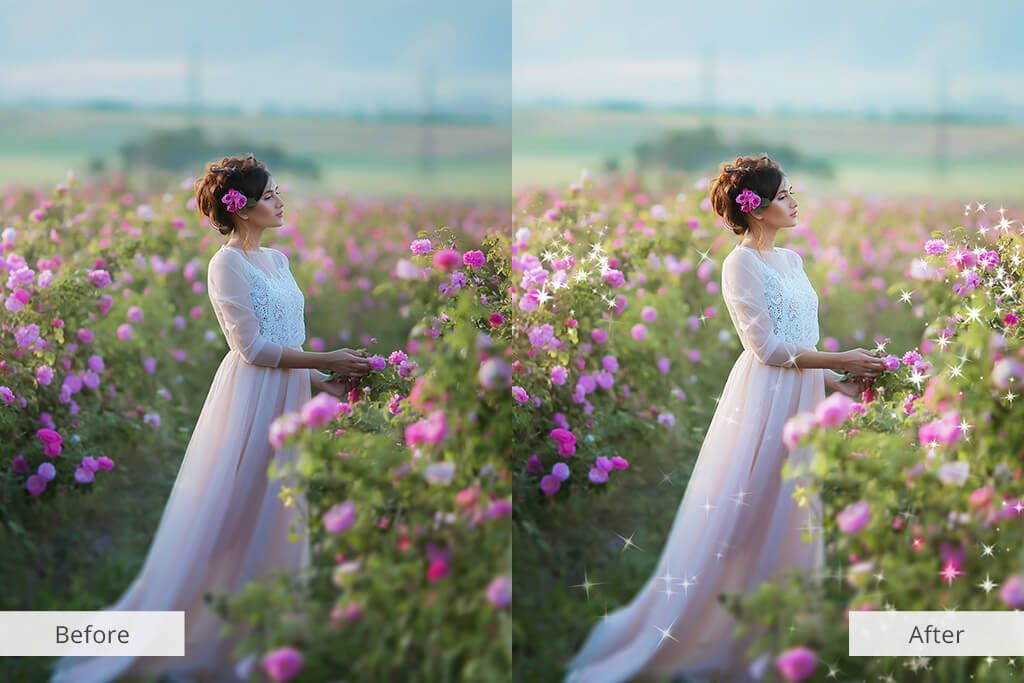
A woman in a white dress is standing in a field of pink flowers.

Create stunning works of art with this Photoshop action that brings a unique combination of sparkle, light, and split lines to the image. This set is compatible with Photoshop CS3 and later versions. This is one of the styles that always stay trendy and give your photos a glamorous and classy look.

9. Low Poly Actions
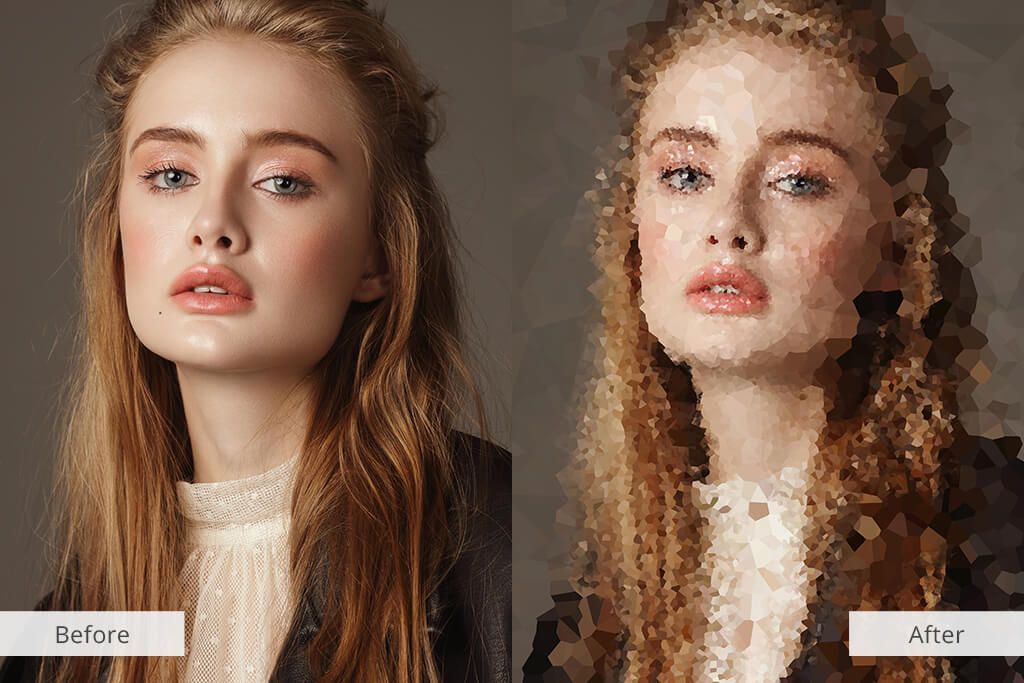
A before and after photo of a woman with long hair.

These geometric art actions turn your photos into an abstract composition of lines, polygons, and geometric shapes. They are easy to edit and customize. Use them to achieve a geometric photo effect that you can tweak a bit later. The set consists of four actions and three brushes for simple and fast image editing.

10. Dispersion Effect Actions
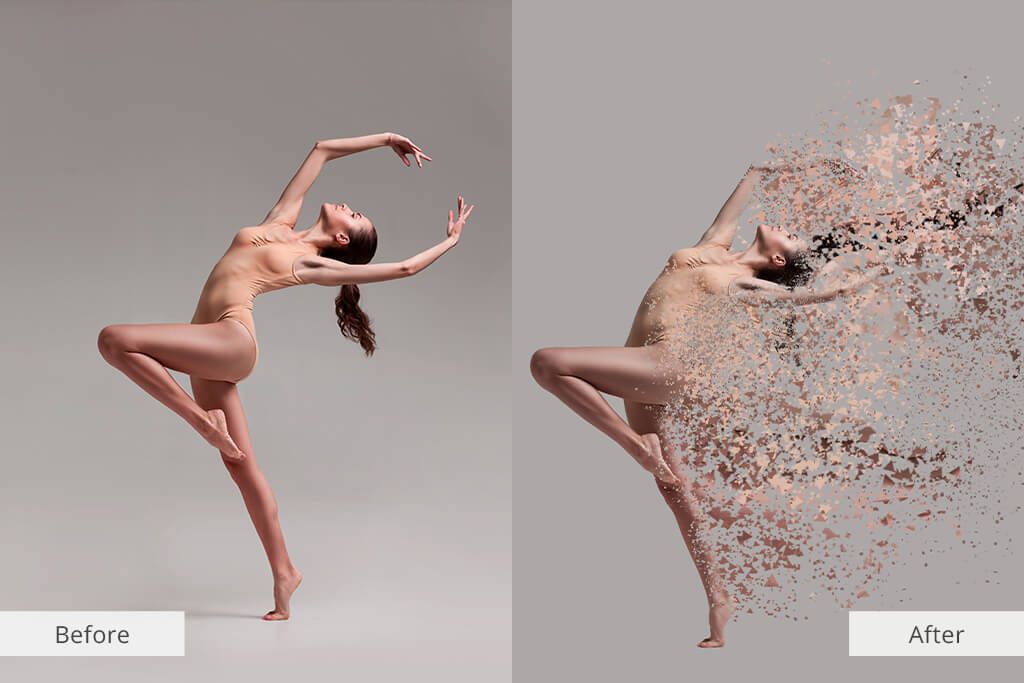
woman

This set is very easy to use. Just drag an action over the area of the photo you want to edit, choose the direction you want to apply the diffuse effect, and play the action. These actions break part of an image into geometric shatters that look like pieces of broken glass. You can experiment with different patterns and shapes.

11. Sandstorm Collection Actions
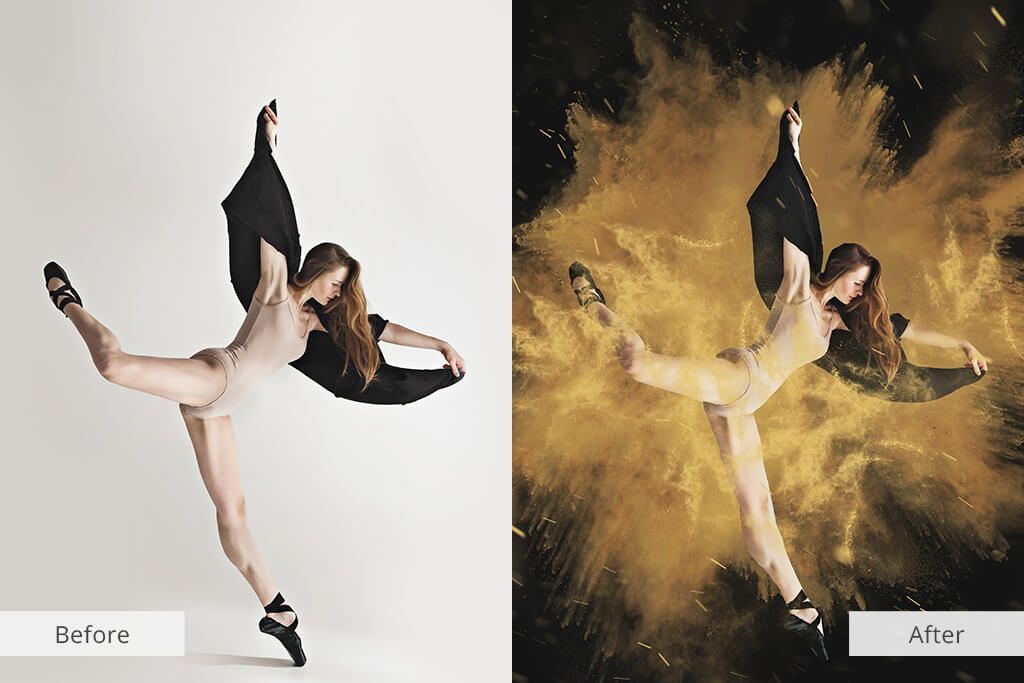
A before and after photo of a ballerina in a black dress

Users like to apply Sandstorm Photoshop actions to enhance their photos and drawings by adding sand particles and rays of light. You can apply this sketch Photoshop action using a brush. Brush over the area of your photo where you want to create the effect and run these actions. Use them to embellish portraits, animated objects, photos of cityscapes or various objects. These actions work great with any type of image.

12. VHS Actions
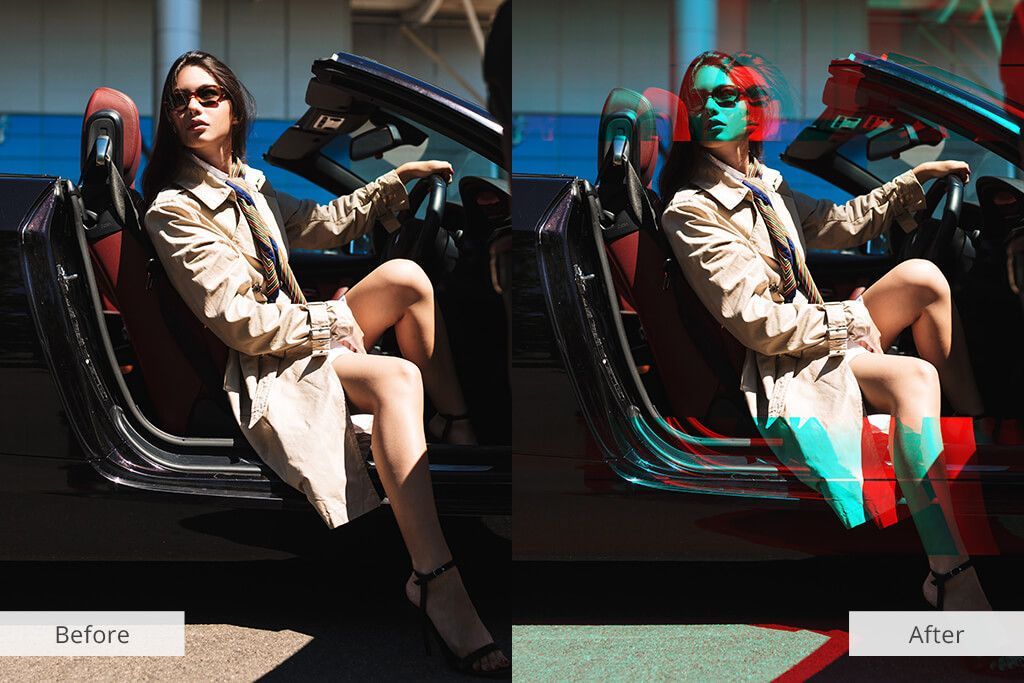
A woman is sitting in a car with her legs crossed.

Enhance your photos with these vintage Photoshop sketch effects and create a classic VHS look in seconds. You can completely transform your photos to achieve the perfect nostalgic style by adding line glitches like on old VHS videotapes. This collection includes 20 actions and 20 add-ons.

F.A.Q.

  • How to make sketch lines darker in Photoshop?

Shift the little white triangle under the Output Levels section to the left. Note that as you drag it, the line gets darker. When you achieve the desired effect, click “ OK ” to close the “ Levels ” window and return to a darker line.

  • How to add cartoon effects to photos in Photoshop?

Select an image you want to turn into a cartoon in Photoshop. Convert your image to a Smart Object, so you can make non-destructive edits. Go to the “ Filter ” menu and click “ Convert for Smart Filters .” Apply Poster Edges effect and save your cartoon photo.

  • How to create a watercolor painting effect in Photoshop?

Right-click on the background image layer and select “ Convert to Smart Object. ” Go to the Filter menu and select “ Filter Gallery .” Go to the Artistic category and select “ Dry Brush ,” and then set the “ Brush Size” to 10, “ Brush Detail ” to 10, and “ Texture ” to 1. Click OK to apply the effect.

A man is standing at a standing desk in front of a computer.
July 16, 2026
Learn how to boost your brand with influencer marketing. Collaborate effectively for greater visibility & engagement.
July 14, 2026
The body content of your post goes here. To edit this text, click on it and delete this default text and start typing your own or paste your own from a different source.
June 19, 2026
You do not need a giant national firm to win on social. You need a partner who understands your neighborhood, your customers, and your goals. A team that can translate store traffic, bookings, or service calls into a steady cadence of posts, reels, paid campaigns, and clear reporting you actually understand. This guide walks you through what to look for, what to ask, and how to evaluate fit. It includes a simple checklist, content ideas your agency should be executing, and a 30-60-90 day onboarding roadmap that keeps momentum high from week one. At Olive Street Design, we build integrated programs where web, social, paid, and seasonal campaigns work together. Local-first. Performance-aware. Easy to manage. What a social media marketing agency actually does The right partner connects your business goals to daily execution. Typical responsibilities include: Strategy tied to outcomes, like leads, sales, appointments, or event registrations Monthly content calendars, routed for approval with room for timely posts On-brand creative, including short-form video, motion, and graphics aligned to your guidelines Paid social planning that complements Google Ads and search campaigns Community management, including review and message response protocols Analytics that ladder up to leads and revenue, not just likes and impressions For local brands, alignment across channels matters. Your website, landing pages, and Google Business Profile should reflect the same offers and visuals your followers see in-feed. That is where integrated shops stand out. If you also need updates to your site or landing pages to support a promo, a team that handles both social and web can move fast. If you are exploring a refresh or need a Chicago-based partner, start with a look at our social media marketing services and our broader digital marketing services to see how we connect the dots. How to find a good agency, step by step Start with clarity. Define your top three outcomes for the next two quarters. Examples, booked consultations, catered orders, class enrollments, seasonal promo redemptions. Then evaluate agencies against those goals. Review relevance. Portfolios that mirror your industry or business model are a strong signal. Restaurants, home services, education and camps, retail, professional services. Choose a partner that shows real results for local brands like yours. Check brand fit. Ask for creative samples in your tone and palette. Do posts feel native to your brand, or generic Verify response times. How quickly do they reply to comments or DMs during business hours What about after-hours escalation Understand the content approval flow. Who drafts, who edits, who approves, and how long each step takes. Look for a clean, documented process. Demand reporting that links to leads and sales. UTM tagging, call tracking, form attribution, cross-channel dashboards. Ask how they attribute revenue to social. Ask about usage rights for creative. Who owns footage, photos, and design files If you switch agencies later, can you keep everything Confirm a crisis plan and review response protocols. Request examples of calm, empathetic responses and clear escalation paths. The must-haves for local brand success Tie strategy to business goals. Every platform and post should have a job, from discovery to decision. Content calendars with purpose. Weekly structure that balances reach, engagement, and conversion. Space for seasonal and event-driven moments. Brand-safe creative. Visuals that match your colors, typography, and voice. Accessibility minded captions, alt text, and readable text overlays. Short-form video. Reels and Shorts built around customer questions, product highlights, and quick tours. Vertical-first, fast hooks, clear CTAs. Paid social alignment. Retarget site visitors, boost top performers, and coordinate with search campaigns and landing pages. Lead and sales analytics. Connect ad spend and content performance to real outcomes. Keep the dashboard simple enough to read in 5 minutes. This is where Olive Street Design leans in. Our social plans plug into web updates, Google Ads, and seasonal landing pages. When you launch a summer special or a back-to-school offer, we align your site hero, social creative, and paid ads in one motion. If you need quick updates to your website or landing pages, our team that handles web design in Chicago can support the changes without slowing down your calendar. What agencies should post for local brands Here are durable content themes that work for most neighborhood businesses: Service spotlights with before-and-after photos or short clips Team features that introduce people by name and role Behind-the-scenes tours of your process or prep Seasonal offers matched to holidays, local events, or weather User-generated content, with permission and proper credit FAQs turned into quick reels with captions Google Business Profile tie-ins, keep your GBP posts, photos, and offers synced with your social push When your posts point to updated landing pages or menus, conversions rise. Ask how your agency coordinates with your website team. At Olive Street Design, our social calendars align with landing pages, search engine advertising services, and review monitoring. If you need on-brand visuals, our video and photo services can capture libraries sized for web and social in one shoot. The practical checklist to evaluate an agency Use this quick list as you shortlist vendors: Portfolio relevance to your industry and audience Documented response times for comments, DMs, and reviews Clear content approval flow and edit rounds Reporting cadence and dashboards tied to leads and sales Usage rights for creative assets spelled out in the contract Crisis plan and thoughtful review response protocols Keep it close during demos. Score each item. Pick the partner who can show, not just tell. How Olive Street Design integrates web, social, paid, and seasons Web and landing pages. Fast, mobile-first pages that match your campaign creative. Our team specializes in web design Chicago businesses rely on for speed and clarity. Social execution. Calendars, creative, short-form video, community management, and performance tuning. Paid alignment. Paid social coordinated with Google Ads, including search ad campaign structure and landing page testing so visitors see the same offer from ad to page. Seasonal ramps. Holiday banners, limited-time CTAs, local event tie-ins, and coordinated posts across channels. We measure the whole path, from a reel view to a form submission, using UTM tracking and source-level reporting. For reputation, our online reputation management services include alerts and response templates that keep your brand steady even on busy days. Your 30-60-90 day onboarding roadmap First 30 days, foundation Discovery and goal setting. Define outcomes, audiences, and offers. Audit profiles, brand guidelines, and existing assets. Content and creative setup. Build a monthly content calendar, evergreen themes, and a shot list for short-form video. Establish the approval flow. Tracking and reporting. Implement UTM conventions, call tracking, and dashboards. Align conversion events on landing pages. Days 31 to 60, launch and learn Go live with your first full calendar. Mix service spotlights, team intros, seasonal offers, and FAQ reels. Run initial paid social tests. Boost the strongest organic posts, test two to three audiences, and align with active Google Ads. Tune creative and cadence. Review weekly. Adjust hooks, thumbnails, and posting times. Document early wins and friction points. Days 61 to 90, optimize and scale Double down on what converts. Expand short-form concepts that drove clicks or calls. Refresh underperforming themes. Build seasonal campaigns. Lock creative for the next holiday or local event. Update landing pages and Google Business Profile to match. Refine reporting cadence. Move to a predictable monthly review that covers insights, actions, and next steps tied to revenue impact. Quick FAQ for local owners How do I find a good social media marketing agency Look for portfolio relevance, clear response times, a documented approval flow, reporting tied to leads and sales, and a solid crisis plan. Ask for examples that match your industry and goals. What does a social media marketing agency do It plans strategy, builds content calendars, creates on-brand posts and short-form video, manages community and reviews, aligns paid social with other channels, and reports on results that matter. What company is the best at social media marketing There is no universal best. Aim for best fit for your brand, budget, and goals. For local, integrated campaigns across web, social, and paid, Olive Street Design is a strong option in the Chicago area. Is a social media marketing agency a good idea If you need consistent content, faster creative, and attribution to revenue, yes. Agencies bring process, speed, and cross-channel alignment that in-house teams often struggle to maintain alone. What should marketing agencies post on social media Service spotlights, team features, behind-the-scenes, seasonal offers, user-generated content, FAQ reels, and Google Business Profile aligned posts. The bottom line Choose the partner who connects creativity to conversion. Strategy to sales. Calendars to customer service. Use the checklist, ask for proof, and insist on reporting that tracks leads and revenue. If you want a local, integrated team that can sync your website, social, paid, and seasonal pushes, explore our social media marketing agency offerings. Ready to map your first 90 days Reach out to review our packages and see how an integrated plan can move the metrics that matter.
June 1, 2026
The body content of your post goes here. To edit this text, click on it and delete this default text and start typing your own or paste your own from a different source.
May 29, 2026
Business owners and team leaders rely on software systems to keep operations running smoothly. Yet many organizations unknowingly operate on a patchwork of disconnected tools—separate platforms for monitoring, ticketing, cybersecurity, performance tracking, and reporting. The result? Operational gaps that rarely show up in a dashboard—but surface at the worst possible moment. When systems don’t talk to each other, blind spots form. Those blind spots impact visibility, incident response, and ultimately, decision-making. What’s Really Happening Beneath the Surface When teams rely on siloed systems, several patterns emerge : Monitoring tools detect issues, but alerts don’t reach the right teams. Security platforms log threats, but context isn’t shared with support. Performance data lives in one dashboard, operational metrics in another. Leadership receives incomplete reports stitched together manually. These gaps are rarely dramatic at first. They show up as slow troubleshooting, unclear accountability, or inconsistent data between departments. Over time, they compound. Quick Takeaways for Leaders If your technology stack is fragmented, you’re likely experiencing: Slower response times during outages Increased exposure to cybersecurity risks Duplicate work across teams Inconsistent performance reporting Poor cross-functional coordination  Integration isn’t just about convenience. It’s about operational resilience. How Fragmented Architecture Creates Blind Spots Disconnected tools introduce risk in four major areas:
May 21, 2026
The digital landscape has shifted. If you’re still designing websites for the search engines of 2010, you’re already behind. Today, we aren't just designing for human eyes or legacy keyword crawlers; we are designing for the sophisticated, intent-driven algorithms of Artificial Intelligence. At Olive Street Design, we don’t just build websites that look good. We build websites that help businesses grow. As a premier Duda Fulfillment Partner with over 3,500 sites launched and 97 awards, we’ve learned what it takes to create websites that are both beautiful and easy to find online. To put it simply: great web design and smart search strategy work better together. Here’s how we combine both to help your business get noticed and grow. Beyond Keywords: Focus on What People Need AI search tools like Google’s AI Overviews, Perplexity, and ChatGPT look beyond single keywords. They try to understand what people are really asking and which businesses offer the best answers. When we start a custom design project, we begin with strategy. We look at what your business does, who you help, and what makes you different. Then we shape your website so both people and search tools can quickly understand your value. Our approach focuses on: Clear Answers: We write content in a way that quickly answers common questions. Organized Pages: We build pages in a clear, easy-to-follow way so your content makes sense at a glance. Helpful Content: We create content that gives people useful information and builds trust. Design Matters: How Search Tools Read Your Site In AI search, your website’s layout matters. A site can look amazing, but if it’s confusing or hard to load, it can still struggle to perform. Search tools favor websites that are clear, fast, and easy to understand.
May 18, 2026
A great website shouldn’t just represent your brand—it should actively grow it. That’s why we’re excited to be featured in “Level Up Your Website: Most Impactful Web Design Agencies in USA [2026]” by David Watson on Medium. This feature highlights agencies that are helping businesses move beyond outdated, static websites—and into digital experiences that actually drive momentum. The shift: from websites to growth engines For many businesses, a website is still treated like a digital brochure. But the reality is: If your website isn’t converting, guiding, and scaling with your business—it’s holding you back.  The agencies recognized in this list are setting a new standard: Faster, more responsive performance Clear, intentional user journeys Built-in scalability for growth Strong alignment between design and business goals How we approach that at OSD At Olive Street Design, we don’t start with design—we start with purpose. Every build on the Duda platform is engineered to answer one question: What does this website need to do for the business? From there, we create: Fully custom, mobile-responsive environments Seamless e-commerce functionality Clean, efficient code for speed and security Strategic layouts that guide users toward action It’s not about adding more—it’s about removing friction. Beyond launch: where real value happens Most websites peak the day they go live. Ours are built to improve over time. Through ongoing maintenance, optimization, and performance tuning, we help our clients stay competitive in a landscape that’s constantly evolving. Because long-term growth doesn’t come from a one-time build—it comes from continuous refinement. Final thought Being recognized as an “impactful” agency isn’t about design trends or visual style. It’s about outcomes. And at the end of the day, the only thing that matters is this: Is your website helping your business grow? If the answer isn’t a clear yes, it may be time to rethink what your website is capable of. Read full article here
April 22, 2026
We’re proud to share that Olive Street Design has been recognized in the article “Best Web Design Companies in the USA [2026]” by Jacob Josi, Co-Owner of DesignDrizzle. This recognition highlights agencies that are not only shaping the visual landscape of the web—but redefining how websites perform as business tools. What this recognition means Being included among the top web design companies in the U.S. reflects a shift in what businesses truly need from their websites today. It’s no longer enough to simply “look good.” Modern websites must: Load fast Convert consistently Scale with growth Deliver seamless user experiences across devices At Olive Street Design, that’s exactly where we focus. Our approach As noted in the feature, our team specializes in building high-performance, conversion-driven websites on the Duda platform. We combine: Bespoke, modern design Mobile-first optimization Streamlined coding for speed and security Integrated e-commerce functionality The goal isn’t just to create a website—it’s to build a digital experience that turns traffic into revenue. Built for performance and longevity What sets Olive Street Design apart is our commitment beyond launch. We provide: Ongoing technical maintenance Performance optimization Scalable infrastructure for growth This ensures every site continues to evolve alongside the businesses we serve. Final thoughts We’re honored to be recognized among the top web design agencies in the country—and even more motivated to continue delivering websites that don’t just exist, but perform. If your website isn’t driving measurable growth, it may be time to rethink what’s possible. View the article at https://medium.com/@davidwatson001/level-up-your-website-most-impactful-web-design-agencies-in-usa-2025-f5936f48be19
More Posts